

novita-sandbox SDK (installation) and reads your API key from NOVITA_API_KEY:
Capabilities
Configuration
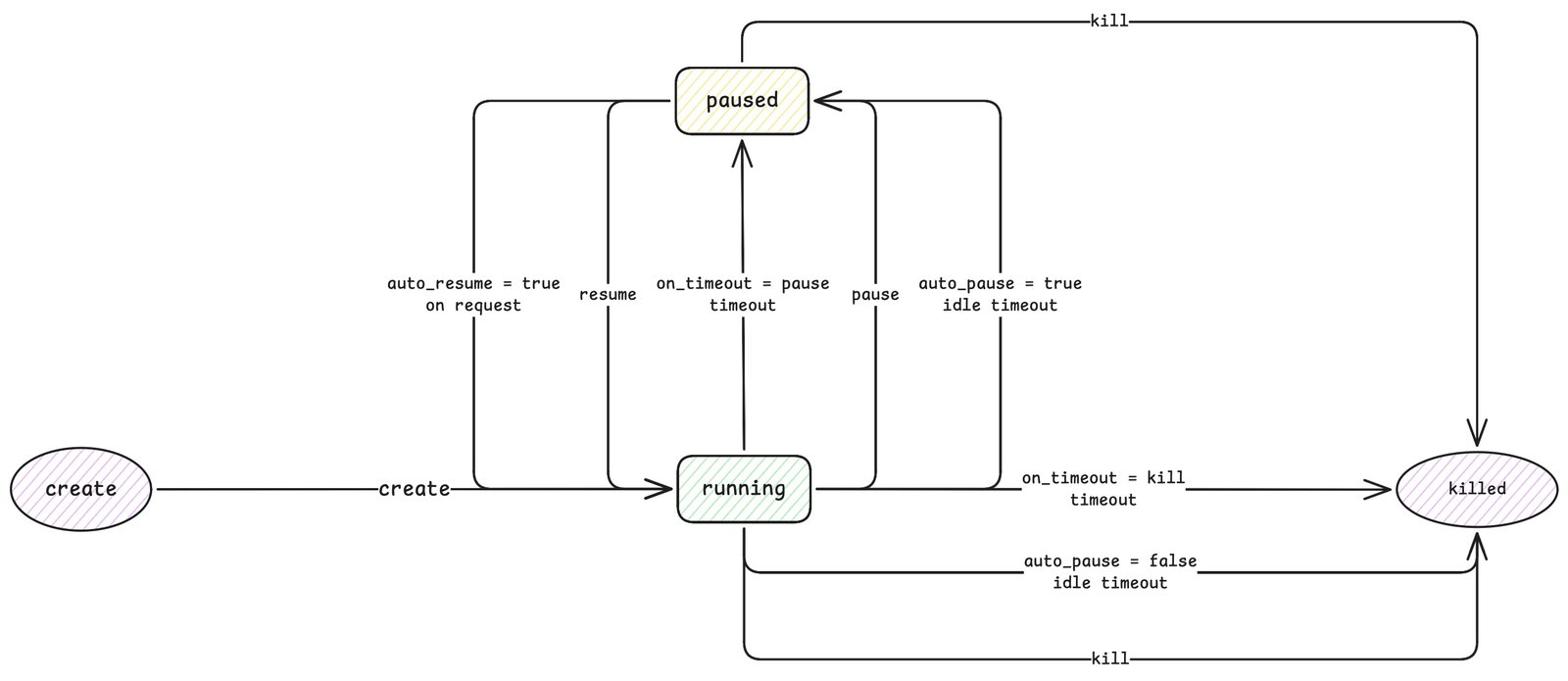
A sandbox is an isolated Linux environment with its own filesystem, processes, and network. You create one from a template and can set its lifetime, environment variables, and metadata for filtering. CPU and memory come from the template.Lifecycle
Timeouts
The timeout is a sandbox’s maximum lifetime (5 minutes by default), counted from creation regardless of activity, while the idle timeout fires only when no client has been connected for the configured duration. Either one kills the sandbox by default; to pause instead, setlifecycle.on_timeout to pause (optionally with auto-resume) for the timeout, or auto_pause for the idle timeout.
Commands
Run any shell command and get its stdout, stderr, and exit code back, stream output as it is produced, or start long-lived processes such as servers in the background. Passcwd, envs, or user to control where and how a command runs.
Filesystem
Each sandbox has 20 GB of disk. Read and write files, upload and download them, inspect metadata, and watch directories for changes.Templates and custom images
A template defines a sandbox’s starting environment — base image, packages, files, and CPU and memory — so every sandbox starts identical and fast. Build one from a base image, a Dockerfile, or a private registry image, then create sandboxes from it by name or ID.Environment variables
Set environment variables for the whole sandbox when you create it, or for a single command. Per-command values override sandbox-wide ones for that command only.Secrets
Secrets store API keys, tokens, and passwords encrypted at the team level. Code in the sandbox only ever sees a placeholder; the real value is injected into HTTPS request headers sent to the hosts you allow, so credentials never appear in your code, templates, snapshots, or environment.Snapshots
A snapshot saves a sandbox’s current state — installed dependencies, generated files, configuration — as a reusable starting point. New sandboxes created from it skip the setup, and the snapshot persists after the original sandbox is deleted.Networking and ports
Sandboxes have internet access by default. Expose any port as a public HTTPS URL, turn outbound access off, or restrict it to an allowlist of domains and CIDRs.Regions
Novita Sandbox currently provides access through the following regions:
The v2 region (us-phx-1) is the default used by the current SDK and CLI. It adds Secrets and Snapshots on top of v1 and is the recommended choice. To use the v1 legacy region instead, set
NOVITA_DOMAIN:
Pricing
Sandboxes are billed per second for CPU and RAM while running, and stop accruing CPU and RAM charges when paused or killed. Templates, snapshots, and paused sandboxes are kept in persistent storage, with 60 GB free per account.
Example: a coding agent runs for 10 minutes in a 2 vCPU / 2 GiB sandbox.
Limits
Default quotas depend on your account tier:
Memory is set in 512 MiB increments, at 0.5–4 GiB per vCPU. See Quota Limits for the full rules, long-running sandboxes for sessions beyond your tier’s cap, and the FAQ on raising concurrency and how long a sandbox can run.
Next steps
Quickstart
Create your first sandbox and run code in it.
Install the SDK and CLI
Python, JavaScript, and command-line setup.
Claude Code Sandbox
Run Anthropic’s coding agent headless in a sandbox.
Codex Sandbox
Run OpenAI Codex on a cloned repo in a sandbox.
OpenCode Sandbox
Run OpenCode on Novita models in a sandbox.
OpenClaw Sandbox
Run OpenClaw agents programmatically in a sandbox.
SDK reference
Every option for creating and managing sandboxes.