LiteLLM is an open-source Python library and proxy server that provides access, spend tracking, and fallbacks to over 100 LLMs through a unified interface in the OpenAI format. With Novita AI models, LiteLLM adds model switching, fallbacks, and request routing through a standardized completion API that works across providers. This guide will show you how to quickly get started with integrating Novita AI and LiteLLM, enabling you to set up this powerful combination and streamline your workflow with ease.

How to Integrate Novita AI with LiteLLM

1

Install LiteLLM

Install the LiteLLM library using pip to create a unified interface for working with different language models.
2

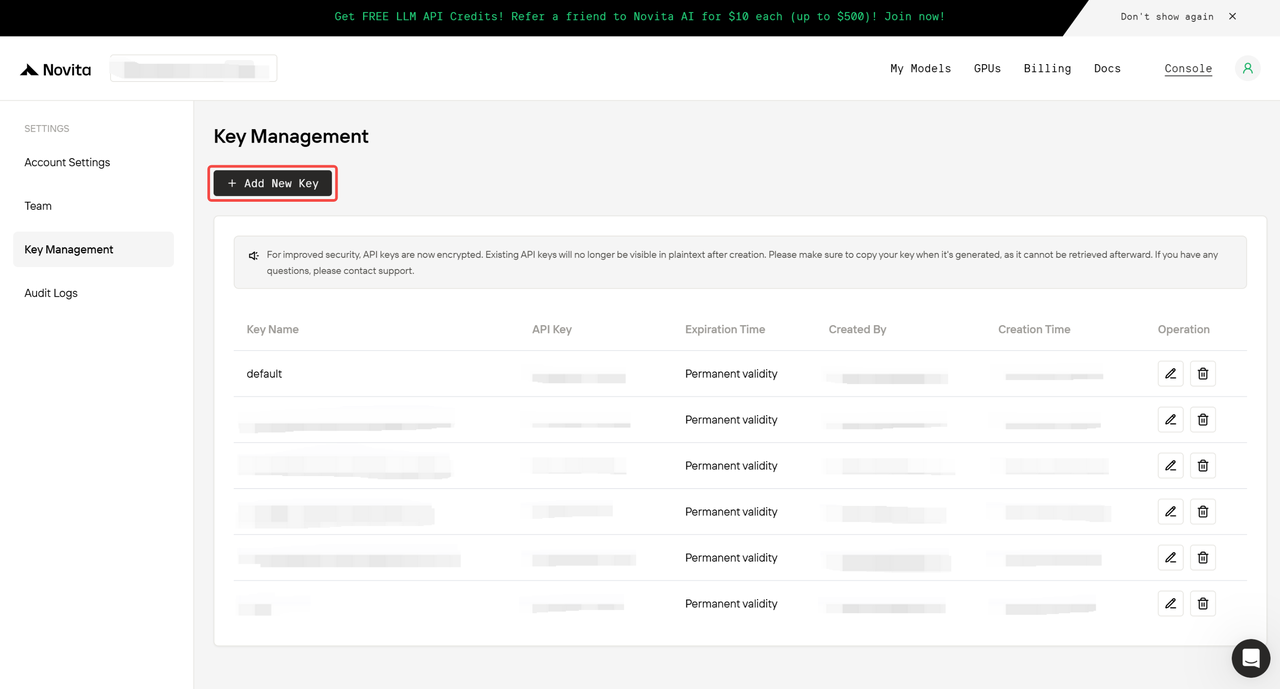
Set Up Your API Credentials

Log in to the key management page in Novita AI and click Add New Key to generate your API key.Visitthekeymanagementpageandselect Add New Keytogenerateyour AP Ikey Pn
3

Structure Your Basic API Call

Create a completion request to Novita AI’s models through LiteLLM’s standardized interface.
4

Implement Streaming for Better User Experience

Enable streaming mode for more interactive applications or when handling longer responses.
Last modified on November 11, 2026