

How to Set Up Portkey AI Gateway
Setting up Portkey AI Gateway takes three steps: configure the gateway, send your first request, and set up routing and guardrails.1
Setup your AI Gateway
To run the gateway locally, make sure Node.js and npm are installed. Then run the following command:After the gateway starts, it displays two URLs:
- The Gateway:
http://localhost:8787/v1 - The Gateway Console:
http://localhost:8787/public/
2
Make your first request
Install the Portkey AI Python library:Then run the following Python code to send your first request:Effortlessly monitor all your local logs in one centralized location using the Gateway Console at:
http://localhost:8787/public/.3
Routing & Guardrails
Portkey AI Gateway lets you configure routing rules, add reliability features, and enforce guardrails. The following is an example configuration: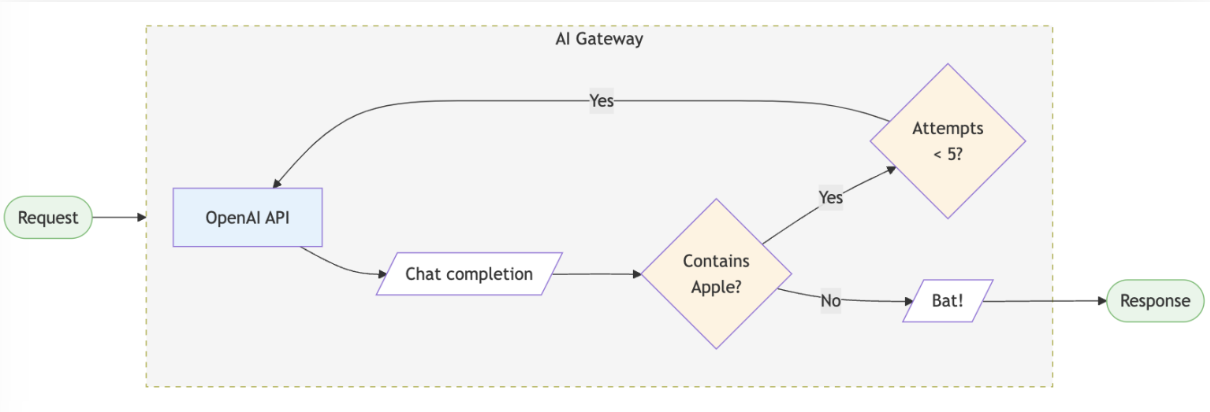
How to Integrate Novita AI API with Portkey
To access the Novita AI API through Portkey AI Gateway, follow these steps:1
Install the Portkey SDK
Add the Portkey SDK to your application to interact with Novita AI’s API through Portkey’s gateway.Node.jsPython
2
Initialize Portkey with the Virtual Key
To integrate Novita AI with Portkey, get your LLM API key from Novita AI and add it to Portkey to generate the virtual key.Node.js SDKPython SDK
3
Invoke Chat Completions with Novita AI
Use the Portkey instance to send requests to Novita AI. If needed, you can override the virtual key in the API call.Node.js SDKPython SDK